2026/09/18(金)dovecot 2.4.5 で auth の挙動が変わっている・・・
2026/09/18 11:28
同時に postfix を 3.11.5 から 3.11.7 へアップデートしています。
postfix の更新インストールは管理上、ソースコードからの構築にて、安定の不具合無しで、
dovecot の更新インストール自体は 前バージョン(2.4.4) で発生していた、ソースコードコンパイル時の不具合は一切無く順調に進んだものの、いざ試験運用させると、
/var/log/postfix.log
Sep 18 01:51:20 www0 postfix/master[21870]: daemon started -- version 3.11.7, configuration /usr/local/etc/postfix
Sep 18 01:51:27 www0 postfix/smtpd[21877]: connect from vmi3565266.contaboserver.net[109.123.231.22]
Sep 18 01:51:27 www0 postfix/smtpd[21877]: fatal: no SASL authentication mechanisms
Sep 18 01:51:28 www0 postfix/master[21870]: warning: process /usr/local/libexec/postfix/smtpd pid 21877 exit status 1
Sep 18 01:51:28 www0 postfix/master[21870]: warning: /usr/local/libexec/postfix/smtpd: bad command startup -- throttling
Sep 18 01:51:45 www0 postfix/smtpd[21886]: connect from unknown[212.132.119.116]
Sep 18 01:51:45 www0 postfix/smtpd[21886]: fatal: no SASL authentication mechanisms
Sep 18 01:51:46 www0 postfix/master[21870]: warning: process /usr/local/libexec/postfix/smtpd pid 21886 exit status 1
Sep 18 01:51:46 www0 postfix/master[21870]: warning: /usr/local/libexec/postfix/smtpd: bad command startup -- throttling
Sep 18 01:52:54 www0 postfix/smtpd[21914]: connect from unknown[91.92.240.92]
Sep 18 01:52:54 www0 postfix/smtpd[21914]: fatal: no SASL authentication mechanisms
Sep 18 01:52:55 www0 postfix/master[21870]: warning: process /usr/local/libexec/postfix/smtpd pid 21914 exit status 1
Sep 18 01:52:55 www0 postfix/master[21870]: warning: /usr/local/libexec/postfix/smtpd: bad command startup -- throttling
/var/log/maillog
Sep 18 01:51:19 www0 dovecot[21787]: master: Dovecot v2.4.5 (0cbb641e3e) starting up for imap, pop3, lmtp
Sep 18 01:51:27 www0 dovecot[21791]: auth: Fatal: auth settings: Failed to parse configuration: Failed to expand auth_realms list key variables: domain: No value to get domain from
Sep 18 01:51:27 www0 dovecot[21787]: master: Error: service(auth): command startup failed, throttling for 2.000 secs
Sep 18 01:51:28 www0 milter-manager[1738]: [statistics] [session][end][connect][pass][1.01182](4925)
Sep 18 01:51:28 www0 milter-manager[1738]: [statistics] [sessions][finished] 1232(+1) 0
Sep 18 01:51:45 www0 dovecot[21791]: auth: Fatal: auth settings: Failed to parse configuration: Failed to expand auth_realms list key variables: domain: No value to get domain from
Sep 18 01:51:45 www0 dovecot[21787]: master: Error: service(auth): command startup failed, throttling for 4.000 secs
Sep 18 01:51:46 www0 milter-manager[1738]: [statistics] [session][end][connect][pass][1.02587](4929)
Sep 18 01:51:46 www0 milter-manager[1738]: [statistics] [sessions][finished] 1233(+1) 0
Sep 18 01:52:54 www0 dovecot[21791]: auth: Fatal: auth settings: Failed to parse configuration: Failed to expand auth_realms list key variables: domain: No value to get domain from
Sep 18 01:52:54 www0 dovecot[21787]: master: Error: service(auth): command startup failed, throttling for 8.000 secs
Sep 18 01:52:55 www0 milter-manager[1738]: [statistics] [session][end][connect][pass][1.01076](4933)
Sep 18 01:52:55 www0 milter-manager[1738]: [statistics] [sessions][finished] 1234(+1) 0
のような感じで、送受信が出来ない。
以前のバージョン(2.4.4) では、正常に機能していたのですが・・・
既存事案を調査しても全く解決せず、色々試行錯誤したところ、どうやら dovecot の設定を変えないとダメっぽい。
dovecot.conf の設定で、
auth_realms = %{domain}
はダメっぽくて、auth_realms = example.basekernel.ne.jp example.or.jpのように、送受信許可するFQDNを半角スペースで区切って羅列しないとダメっぽい。
弊社の場合 postfix の SASL に dovecot を使用しているので、「送受信」共に意識しないといけないのです。
この設定変更で解決したようですが、2~3日様子を見て、問題なさそうであれば、本番環境への適用となります。
適用する場合、連休中に本番環境への適用作業を完了させる予定です。
2026/08/16(日)素の dovecot 2.4.4 では、FreeBSD ではコンパイル不能
2026/08/16 04:11
だいぶ安定してきているようですが、dovecot Ver 2.4.4 と FreeBSD 14/15 の組み合わせでは、
どう頑張っても、構築(ソースコードからのコンパイル)途上で、
gmake[3]: *** 'auth' に必要なターゲット '-L/usr/local/lib' を make するルールがありません. 中止.というエラーで中断してしまう。
gmake[3]: ディレクトリ '/usr/local/src/dovecot-2.4.4/src/auth' から出ます
gmake[2]: *** [Makefile:616: all-recursive] エラー 1
gmake[2]: ディレクトリ '/usr/local/src/dovecot-2.4.4/src' から出ます
gmake[1]: *** [Makefile:747: all-recursive] エラー 1
gmake[1]: ディレクトリ '/usr/local/src/dovecot-2.4.4' から出ます
gmake: *** [Makefile:589: all] エラー 2
これの対処は、dovecot CE コミュニティ( https://dovecot.org/mailman3/archives/list/dovecot@dovecot.org/message/H5A63W7DX7A24DGW4VY6ESW32CBARCF2/ ,2026/08/16 現在)にて、解決手法が記載されているものの、これだけでは解決しない模様。。。
提起の src/auth ディレクトリ配下の
 --- src/auth/Makefile.am.orig
 +++ src/auth/Makefile.am
 @@ -200,7 +200,7 @@
  endif

  if HAVE_LUA
 -auth_libs += $(LIBDOVECOT_LUA) $(LUA_LIBS)
 +auth_libs += $(LIBDOVECOT_LUA)
  endif

  if AUTH_LUA_PLUGIN
の変更だけでは、当方の環境では、このコンパイルエラーを回避できず、更に、
Makefile.in ファイルを
 --- src/auth/Makefile.in.orig
 +++ src/auth/Makefile.in
 @@ -106,7 +106,7 @@

  @HAVE_LDAP_TRUE@@LDAP_PLUGIN_TRUE@am__append_6 = libauthdb_ldap.la
  @HAVE_LDAP_TRUE@@LDAP_PLUGIN_FALSE@am__append_7 = $(LIBDOVECOT_LDAP)
 -@HAVE_LUA_TRUE@am__append_8 = $(LIBDOVECOT_LUA) $(LUA_LIBS)
 +@HAVE_LUA_TRUE@am__append_8 = $(LIBDOVECOT_LUA)
  @AUTH_LUA_PLUGIN_TRUE@am__append_9 = libauthdb_lua.la
  subdir = src/auth
  ACLOCAL_M4 = $(top_srcdir)/aclocal.m4
のように変更したことで、構築できました。参考になれば幸いです。
2026/06/02(火)Icecast 2.5.0 は FreeBSD ではまともに動作しないので「ダウングレード」した
2026/06/02 13:37
Icecast 2.5.0 と ezstream 0.5.6 の組合せは FreeBSD では使えない模様
Icecast は、Webラジオをサービスするにあたって、おそらく最も使用されているサーバソフトウェアと思われます。
ところが、 Icecast 2.4.4 を Icecast 2.5.0(FreeBSD Ports での最新版)にアップデートすると、
こうなります ↓
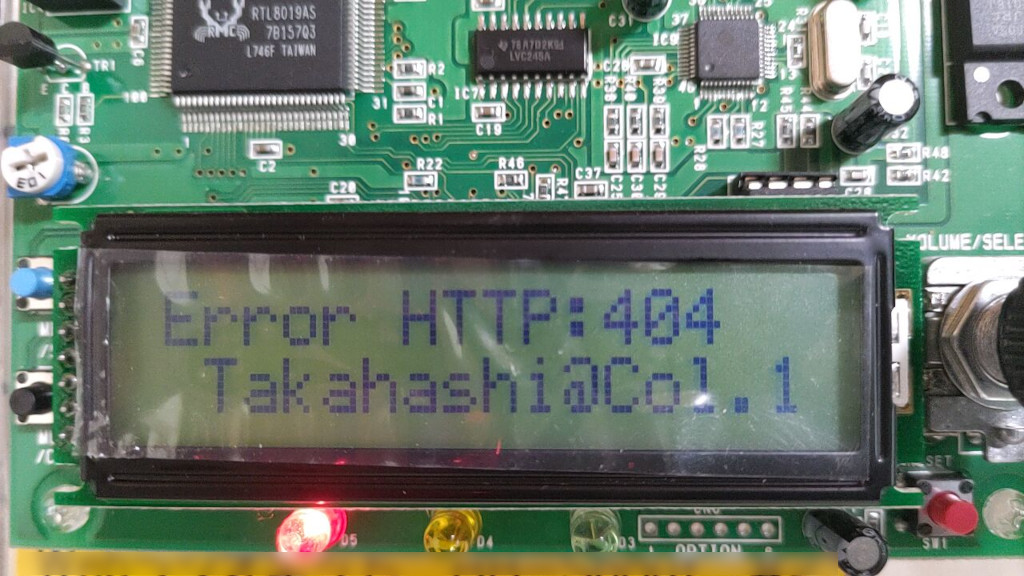

「404 File Not Found」という謎のエラー。
動作ログを眺めると
EROR admin/admin_handle_request Error parsing command string or unrecognised command: \x21POKE
EROR util/util_http_select_best Input string does not parse as KVA. Selecting first option.
というのが残っています。
どうも、 '!POKE' (「\x21」は「!」の文字コードです)いうコマンド(?) が ezstream 側から発生しており、
Icecast 2.5 側で「意味不明」として処理されているのが直接の原因らしいです。
FreeBSD 14/15 で Webラジオストリーミングをする場合、
# pkg info | grep icecast

ezstream-0.5.6_11              Command line utility for streaming to icecast servers
icecast-2.5.0,1                Streaming mp3/ogg-vorbis audio server
このバージョンの組み合わせで Ports/Package で提供されており、ezstream の古さが際立っている感はあります。(ezstream の最新バージョンは 1.0.2)
おそらく、ezstream 1.0.2 を「ソースコードから適切にインストール」すればよいのでしょうが、
どうも上手くいきません・・・・・・
なのでIcecast 2.4.4 に「ダウングレード」することにしました。
あまり経験がないので、以下はその手順です。他のPorts でも応用が利きます。
Icecast 2.5.0 を ダウングレード
まず、 Ports から、 ports-mgmt/portdowngrade と、devel/subversion をインストールします。# cd /usr/ports/ports-mgmt/portdowngrade # make install clean # cd /usr/ports/devel/subversion # make install clean # rehash # cd実際、portdowngrade は、subversion が無いと動作しない(依存関係にある)のですが、
自動で依存関係のインストールをしないため、手動で2つのPorts をインストールします。
最後の cd は、ログインユーザのホームディレクトリに移動するためのものです。
一連の動作は root ユーザで行うとトラブルなく進みます。
# portdowngrade audio/icecast | more
 または
# portdowngrade audio/icecast > (好きな名前のファイル名)
として、更新リビジョン履歴を取得・表示します。
通常、表示画面に収まらない分量なので、 上記のやりやすいほうでどうぞ。
こんな感じで、リビジョン情報が取得できます:
Choose a revision from this list and run /usr/local/sbin/portdowngrade audio/icecast revision
------------------------------------------------------------------------
r514128 | bapt | 2019-10-09 19:20:58 +0900 (2019/10/09 (水)) | 2 lines

Drop the ipv6 virtual category for a* category  as it is not relevant anymore

------------------------------------------------------------------------
r508834 | mat | 2019-08-14 01:00:39 +0900 (2019/08/14 (水)) | 2 lines

Convert to UCL & cleanup pkg-message (categories a-c)

------------------------------------------------------------------------
r484332 | sunpoet | 2018-11-07 06:09:42 +0900 (2018/11/07 (水)) | 8 lines

Update to 2.4.4

- Update MASTER_SITES
- Fix LIB_DEPENDS
- Use USES=gnome

Changes:        https://gitlab.xiph.org/xiph/icecast-server/raw/release-2.4.4/ChangeLog

------------------------------------------------------------------------
r483913 | sunpoet | 2018-11-04 07:15:38 +0900 (2018/11/04 (日)) | 5 lines

Move audio/icecast2 to audio/icecast

- Clean up Makefile
- Bump PORTREVISION for package change

------------------------------------------------------------------------
r478138 | sunpoet | 2018-08-27 03:41:03 +0900 (2018/08/27 (月)) | 2 lines

Update WWW
上記は、最初の一部です。直前の Icecast リビジョンは r514128 のようなので、このリビジョン(バージョン)へダウングレードします。
次に、該当リビジョンの Ports 取得を行います:
# portdowngrade audio/icecast r514128コマンドを実行したカレントディレクトリに取得した Ports ディレクトリが作成されることに注意してください。
/usr/ports ディレクトリツリー配下で、 portdowngrade コマンドを実行しないようにしましょう。
本例示の場合は、カレントディレクトリに icecast ディレクトリが作成され、これが Ports ディレクトリになり
ます。
その次に、いよいよダウングレード作業ですが、
ここでの注意点は、「現在のリビジョンを先ず消去すること」です。
以下のように手順を進めます:
# cd /usr/ports/audio/icecast
# make deinstall
# cd
# cd icecast
# make install clean
これで、icecast は 2.4.4 にダウングレードされ、ezstream 0.5.6 との組み合わせで不具合は解消しました。
こんな感じ ↓
# pkg info | grep icecast

ezstream-0.5.6_11              Command line utility for streaming to icecast servers
icecast-2.4.4,1                Streaming mp3/ogg-vorbis audio server
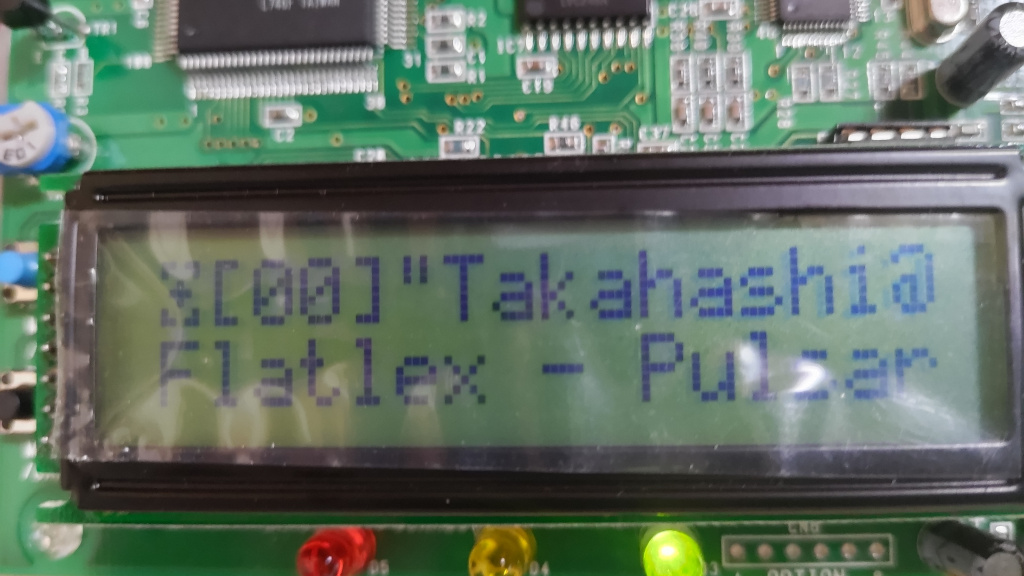

この Icecast ストリーミングは、エンドレスで数十曲の音楽垂れ流しをしていますが、
著作権上の問題があり非公開です。個人で聴取するためと、技術的検証目的で稼働させています。
最後に、ちょっと気になるのですが、最近の Ports は、確か git による管理に移行していて、 subversion での管理は過去のものだったような??
2026/05/27(水)dovecot 2.4.3 は FreeBSD15 で使える
2026/05/27 14:54
最近、旧バージョンからの入れ替えで運用開始しましたが、特に問題は起きていないようです。
[2026/06/02 追記]
dovecot 2.4.3 を SASL にしている場合、
認証形式のうち、DIGEST-MD5 が正常に機能しない場合があることを確認しています。
dovecot 2.4.3にて DIGEST-MD5 の実装に何かしらの変化か問題があるものと認識しています。
因みに dovecot は、メールサーバにインストールし、POP3/IMAP4 サーバとして機能させる為のものです。
ソースコードを /usr/local/src ディレクトリ上に置いた gz アーカイブから展開し、
# setenv CPPFLAGS '-I/usr/local/include -I/usr/include'
# setenv LDFLAGS '-L/usr/local/lib -L/usr/lib'
# cd dovecot-2.4.3
# ./configure --sysconfdir=/usr/local/etc/ --localstatedir=/var --with-ldap=yes --with-ssldir=/usr --with-lua --with-pcre2 --without-bsdauth
として、
# gmake
# gmake install
で大丈夫です。dovecot 2.4.1 からのアップデートでは、特に dovecot.conf 群の変更は必要無いと思います。
一部、configure のオプションを変更していますが、Warning が出るので、適宜変更しています。
また、gmake 進行途上で
*** Warning: Linking the executable test-smtp-client-errors against the loadable module
*** libssl_iostream_openssl.so is not portable!
という、メッセージが時折出力されますが、FreeBSD14,FreeBSD15 上での dovecot 2.4.3 運用においては、特に支障ないという見解になっています。
2026/05/25(月)FreeBSD Ports における FLAVOR の件・・・
2026/05/27 15:39
この件について、正直なところ、まともな理解をしていなかった訳だが・・・
FLAVOR (フレーバ) とは、簡単に述べると『構築選択メニュー』のようなものです。
最も判りやすいのは 「X11 対応あり」か「X11 対応無し」かを、選択する感じです。
例えば、ImageMagick 7.x を Ports にて X11 対応無しでインストールする場合、
 # cd /usr/ports/graphics/ImageMagick7
  # make install FLAVOR=nox11
でインストール出来ます。
FLAVOR を指定しない場合、ImageMagick7 の場合は、「X11 対応あり」で構築が進んでしまい、
X11 を使わない場合に、大量の不要ソフトウェアがインストールされてしまいます。
また、アップデートする場合、
多くの方々が使われていると思われる、portupgrade は、今だに FLAVOR 付き Ports には対応していません。
手っ取り早く、FLAVOR 対応済の、portmaster を使用することになります。
で、この FLAVOR は、Ports 毎に種別や有無があり、どのような FLAVOR があるのかを確認するには、各々の Ports ディレクトリ直下で
# make pretty-flavors-package-namesを実行します。ImageMagick7 の場合は、おもむろに上記を実行すると、
 x11: ImageMagick7-7.1.2.23
 nox11: ImageMagick7-nox11-7.1.2.23
のように出力され、x11 と nox11 の2つのFLAVOR が確認出来ます。
一方で FLAVOR が設定されていない Ports の場合は、
no flavor: perl5-5.42.2のように出力されます。
しかし!! これは覚えにくい!!
何故、「pretty-flavors-package-names」・・・なんて、こんな長ったらしいのか!
素直に make flavors とかにすればよいのに、、とか思ってしまう。
2025/11/06(木)dovecot 2.4.2 がリリースされたが・・・・
2025/11/06 02:21
ソースコードを /usr/local/src ディレクトリ上に置いた gz アーカイブから展開し、
# setenv CPPFLAGS '-I/usr/local/include -I/usr/include'
# setenv LDFLAGS '-L/usr/local/lib -L/usr/lib'
# cd dovecot-2.4.2
# ./configure --sysconfdir=/usr/local/etc/ --localstatedir=/var --with-ldap=yes --with-ssldir=/usr --program-transform-name=gsed --with-libbsd --without-bsdauth --without-pam
として、
# gmakeを実行・・・ 数分後、
  CCLD     test-lib
gmake[4]: ディレクトリ '/usr/local/src/dovecot-2.4.2/src/lib' から出ます
gmake[3]: ディレクトリ '/usr/local/src/dovecot-2.4.2/src/lib' から出ます
Making all in lib-regex
gmake[3]: ディレクトリ '/usr/local/src/dovecot-2.4.2/src/lib-regex' に入ります
  CC       test-regex.o
  CC       regex.lo
  CCLD     libdregex.la
gmake[3]: *** 'test-regex' に必要なターゲット '-L/usr/local/lib' を make するルールがありません.  中止.
gmake[3]: ディレクトリ '/usr/local/src/dovecot-2.4.2/src/lib-regex' から出ます
gmake[2]: *** [Makefile:600: all-recursive] エラー 1
gmake[2]: ディレクトリ '/usr/local/src/dovecot-2.4.2/src' から出ます
gmake[1]: *** [Makefile:733: all-recursive] エラー 1
gmake[1]: ディレクトリ '/usr/local/src/dovecot-2.4.2' から出ます
gmake: *** [Makefile:575: all] エラー 2
となるんです。
当方の固有環境の原因か、FreeBSD 固有の環境要因か切り分けと調査を試みるも、色々試行錯誤しても判らない。
コンパイルの最初のほうで出るので、全く構築になっていない。
これとは全く別件事象で、Linux環境でもコンパイルエラーになるというのを、本家サイトで確認。
どうも最新のCコンパイラにて、 src/lib/unicode-transform.c がコンパイルエラーになるということらしいです。
[https://dovecot.org/mailman3/archives/list/dovecot@dovecot.org/thread/DJTESZXLEZS3WHDGSXX26GIRBGWTHN3Y/]
ということで、現時点で FreeBSD にて dovecot 2.4.2 は『使えない』という事態になっています。
2025/06/04(水)milter-manager は OpenDMARC を自動検出しない!
2025/06/04 04:57
複数の milter を直感的に指定できるようになっていたり(当初から?)しているので、milter-manager を使う出番はそろそろ・・・
という状況ですが、一度にあれもこれもカスタマイズ出来ないので、milter-manager を使い続けているわけですが・・・
最初は、milter-manager 経由で動作させている OpenDKIM は機能しているのに、どう頑張っても OpenDMARC が付けてくれるはずのメールヘッダが一向に付かないので悩んでいました。
OpenDMARC を milter-manager 経由で稼働させている実績はどうやら一般的に皆無で、マイナーな milter なのか、と思ってたりしましたが・・・
そもそも、milter-manager に OpenDMARC milter が識別されているのかどうかになります。
なので、おもむろに
# /usr/local/sbin/milter-manager -u milter-manager --show-configを実施すると・・・
# /usr/local/lib/milter-manager/binding/lib/milter/manager/detector.rb:37
define_milter("milter-opendkim") do |milter|
  # /usr/local/lib/milter-manager/binding/lib/milter/manager/detector.rb:45
  milter.connection_spec = "local:/var/run/milteropendkim/dkim-milter"
  # default
  milter.description = nil
  # /usr/local/lib/milter-manager/binding/lib/milter/manager/detector.rb:38
  milter.enabled = true
  # default
  milter.fallback_status = "accept"
  # default
  milter.evaluation_mode = false
  # default
  milter.applicable_conditions = []
  # /usr/local/lib/milter-manager/binding/lib/milter/manager/detector.rb:40
  milter.command = "/usr/local/etc/rc.d/milter-opendkim"
  # /usr/local/lib/milter-manager/binding/lib/milter/manager/detector.rb:41
  milter.command_options = "start"
  # default
  milter.user_name = nil
  # default
  milter.connection_timeout = 297.0
  # default
  milter.writing_timeout = 7.0
  # default
  milter.reading_timeout = 7.0
  # default
  milter.end_of_message_timeout = 297.0
end
は、出てくるが、milter-opendmarc は出てきません。つまり、認識されていなかった。。orz...ここから、自動認識させるための試行錯誤が始まります。
先ず、/usr/local/etc/milter-manager/defaults/freebsd.conf を修正してみます:
33行目あたりに、
  ["clamav-milter", []],
  ["milter-dkim", []],
  ["milter-opendkim", []],
  [
    "spamass-milter",
    [
      "Remote Network",
      "Unauthenticated",
      "No Stress",
    ],
  ],
とあるので、["milter-dkim", []] とある行の下に、 ["milter-opendmarc", []], を追加し、
  ["clamav-milter", []],
  ["milter-dkim", []],
  ["milter-opendkim", []],
  ["milter-opendmarc", []],
  [
    "spamass-milter",
    [
      "Remote Network",
      "Unauthenticated",
      "No Stress",
    ],
  ],
のようにします。これで、# /usr/local/sbin/milter-manager -u milter-manager --show-configを実施すると、"milter-opendmarc" は識別されるようになりました。
注意点としては、FreeBSD の場合、/usr/local/etc/rc.d 配下のスクリプトファイル名を milter-opendmarc にし、実行権を与えておくようにしておくことが必須です。
これで解決か?と思ったんですが、
今度はメールを受信する度に /var/log/maillog に
milter-manager[53830]: [egg][error] must set connection spec: milter-opendmarcという、エラーが出て OpenDMARCは動作しません。再び、
# /usr/local/sbin/milter-manager -u milter-manager --show-configとすると、
# /usr/local/lib/milter-manager/binding/lib/milter/manager/detector.rb:37
define_milter("milter-opendmarc") do |milter|
  # /usr/local/lib/milter-manager/binding/lib/milter/manager/detector.rb:45
  milter.connection_spec = nil ← 注目
  # default
  milter.description = nil
  # /usr/local/lib/milter-manager/binding/lib/milter/manager/detector.rb:38
  milter.enabled = true
  ・・・・
要するに、milter-manager からは、接続先不明状態という状況。幸いにも OpenDKIM が機能しているので、これを手掛かりに 自動検出スクリプトの修正を行いました。。。
先ず、/usr/local/lib/milter-manager/binding/lib/milter/manager にディレクトリを移動します:
修正したのは、
detector.rb
freebsd-rc-detector.rb
の2つ。新規に opendkim-config-parser.rb を参考に、 opendmarc-config-parser.rb を追加で作成しています。
結構あちこち修正したので、差分を提示しておきます。
1) detector.rb
※ [2026/05/27 追記] 例示の diff は milter-manager 2.2.7 のもので、 2.2.9 では数行前後しています。
--- detector.rb.old 2024-08-12 05:01:29.000000000 +0900
+++ detector.rb.new 2025-06-03 23:53:01.772724000 +0900
@@ -16,6 +16,7 @@
 require 'milter/manager/clamav-milter-config-parser'
 require 'milter/manager/milter-greylist-config-parser'
 require 'milter/manager/opendkim-config-parser'
+require 'milter/manager/opendmarc-config-parser'
 require 'milter/manager/rmilter-socket-detector'
 require 'milter/manager/rspamd-proxy-detector'

@@ -85,6 +86,10 @@
       opendkim_config_parser.socket
     end

+    def detect_opendmarc_connection_spec
+      opendmarc_config_parser.socket
+    end
+
     def detect_rmilter_connection_spec
       Milter::Manager::RmilterSocketDetector.new(rmilter_conf).detect
     end
@@ -138,6 +143,7 @@
       @clamav_milter_config_parser = nil
       @milter_greylist_config_parser = nil
       @opendkim_config_parser = nil
+      @opendmarc_config_parser = nil
     end

     def set_variable(name, unnormalized_value)
@@ -265,5 +271,14 @@
       end
       @opendkim_config_parser
     end
+
+    def opendmarc_config_parser
+      if @opendmarc_config_parser.nil?
+        @opendmarc_config_parser = Milter::Manager::OpenDMARCConfigParser.new
+        @opendmarc_config_parser.parse(opendmarc_conf)
+      end
+      @opendmarc_config_parser
+    end
+
   end
 end
2)freebsd-rc-detector.rb※ [2026/05/27 追記] 例示の diff は milter-manager 2.2.7 のもので、 2.2.9 では数行前後しています。
--- freebsd-rc-detector.rb.old  2024-08-12 05:01:29.000000000 +0900
+++ freebsd-rc-detector.rb.new  2025-06-04 00:05:45.417658000 +0900
@@ -55,6 +55,10 @@
       @script_name == "milter-opendkim" or @name == "milteropendkim"
     end

+    def opendmarc?
+      @script_name == "milter-opendmarc" or @name == "milteropendmarc"
+    end
+
     def detect_rmilter_connection_spec
       Milter::Manager::RmilterSocketDetector.new(rmilter_conf).detect
     end
@@ -92,6 +96,12 @@
         "/usr/local/etc/opendkim.conf"
     end

+    def opendmarc_conf
+      @variables["cfgfile"] ||
+        extract_parameter_from_flags(command_args, "-C") ||
+        "/usr/local/etc/opendmarc.conf"
+    end
+
     def rmilter_conf
       extract_parameter_from_flags(command_args, "-c") ||
         "/usr/local/etc/rmilter.conf"
@@ -111,6 +121,7 @@
       spec ||= detect_enma_connection_spec if enma?
       spec ||= detect_clamav_milter_connection_spec if clamav_milter?
       spec ||= detect_opendkim_connection_spec if opendkim?
+      spec ||= detect_opendmarc_connection_spec if opendmarc?
       spec ||= detect_rmilter_connection_spec if rmilter?
       spec ||= detect_rspamd_proxy_connection_spec if rspamd?
       spec
@@ -141,6 +152,17 @@
           detector.detect
           detector.apply(loader)
         end
+      end
+      if opendmarc? and _profiles and !_profiles.empty?
+        _profiles.each do |profile|
+          detector = FreeBSDRCProfileDetector.new(@configuration,
+                                                  @script_name,
+                                                  profile,
+                                                  self,
+                                                  &@connection_spec_detector)
+          detector.detect
+          detector.apply(loader)
+        end
       else
         super
       end
@@ -206,6 +228,10 @@
     end

     def detect_opendkim_connection_spec
+      super || @base_variables["socket"]
+    end
+
+    def detect_opendmarc_connection_spec
       super || @base_variables["socket"]
     end
3)opendmarc-config-parser.rbopendkim-config-parser.rb をコピーし、下記の修正です:
--- opendkim-config-parser.rb   2025-05-26 02:31:08.119826000 +0900
+++ opendmarc-config-parser.rb  2025-06-03 23:47:40.989538000 +0900
@@ -16,7 +16,7 @@
 require "milter/manager/file-reader"

 module Milter::Manager
-  class OpenDKIMConfigParser
+  class OpenDMARCConfigParser
     def initialize
       @variables = {}
     end
当方は、ruby は殆ど扱った経験は無いので、「見よう見真似」と「推測」で修正しており、実際はもっと小規模な修正で出来るかもしれませんし、更なる修正が必要かもしれません。上記の修正後、
# /usr/local/sbin/milter-manager -u milter-manager --show-configを実施すると、
# /usr/local/lib/milter-manager/binding/lib/milter/manager/detector.rb:37
define_milter("milter-opendmarc") do |milter|
  # /usr/local/lib/milter-manager/binding/lib/milter/manager/detector.rb:45
  milter.connection_spec = "local:/var/run/opendmarc/socket"  ← 注目
  # default
  milter.description = nil
  # /usr/local/lib/milter-manager/binding/lib/milter/manager/detector.rb:38
  milter.enabled = true
  # default
  milter.fallback_status = "accept"
  # default
  milter.evaluation_mode = false
  # default
  milter.applicable_conditions = []
  # /usr/local/lib/milter-manager/binding/lib/milter/manager/detector.rb:40
  milter.command = "/usr/local/etc/rc.d/milter-opendmarc"
  # /usr/local/lib/milter-manager/binding/lib/milter/manager/detector.rb:41
  milter.command_options = "start"
  # default
  milter.user_name = nil
  # default
  milter.connection_timeout = 297.0
  # default
  milter.writing_timeout = 7.0
  # default
  milter.reading_timeout = 7.0
  # default
  milter.end_of_message_timeout = 297.0
接続先も認識され、めでたく OpenDMARC が milter-manager で利用できるようになりました。これで、今年2月にやりたかった DMARC 対応が、設備移転で全く出来なかった状況を脱し、やっと準備完了となりました・・orz
2025/05/26(月)〔FreeBSD Ports〕glib、gobject-introspection のコンパイルエラー
2025/05/27 00:05
portupgrade コマンドを常用している方々はそこそこ居られると思うのですが、
このコマンドを使用して glib と gobject-introspection をアップデートすると・・・
glib-2.84.1,2 depends on file: /usr/local/gobject-introspection-bootstrap/bin/g-ir-scanner - not foundのようなエラーとなって、構築不能となる。
*** Error code 1
Stop.
make[1]: stopped in /usr/ports/devel/glib20
*** Error code 1
要するに構築に必要な g-ir-scanner 実行ファイルが見つからないので、どうにも出来ないという状況。
この件の情報収集をしていると、「/usr/ports/UPDATING に記載がある」といいます。
確かに、提起のテキストファイル内の 20250402: と記載がある行の下に記載があります:
20250402:正直、「どう対処するのか?」という観点では非常に判りにくいです:
AFFECTS: users of devel/glib20 and devel/gobject-introspection building outside of Poudriere
AUTHOR: arrowd@FreeBSD.org
New versions of glib started to require gobject-introspection as a build
dependency, while gobject-introspection requires glib to build. This forms a
dependency cycle that is dealt with by introducing the @bootstrap flavor for
mentioned ports. This solution is suggested by the upstream as well, see
https://discourse.gnome.org/t/dealing-with-glib-and-gobject-introspection-circular-dependency/18701
When building devel/glib20 in Poudriere no manual intervention is required.
The devel/glib20@bootstrap gets built first and provides for
devel/gobject-introspection@bootstrap. This in turn provides for a normal
devel/glib20 build, which finally fulfills a dependency for normal devel/gobject-introspection
Users that are building outside of the isolated environments will be ending
up with useless glib-bootstrap and gobject-introspection-bootstrap packages
installed after each update. These can be removed with
pkg remove glib-bootstrap gobject-introspection-bootstrap
Google翻訳をしてみました。
20250402:更に見ていくと、どうもこの「フレーバー」という仕組みが最近 Ports に組み込まれたらしく、現行のportupgrade (Ver 2.4.16) ではこの仕組みを解釈出来ないことが原因の模様。
影響: Poudriere 以外で devel/glib20 および devel/gobject-introspection をビルドするユーザー
作成者: arrowd@FreeBSD.org
glib の新しいバージョンでは、ビルド依存関係として gobject-introspection が必須になりました。一方、gobject-introspection はビルドに glib を必要とします。これにより依存関係の循環が発生しますが、上記の port に @bootstrap フレーバーを導入することで対処できます。この解決策はアップストリームでも提案されています。詳細は、https://discourse.gnome.org/t/dealing-with-glib-and-gobject-introspection-circular-dependency/18701 を参照してください。
Poudriere で devel/glib20 をビルドする場合、手動による介入は不要です。
devel/glib20@bootstrap が最初にビルドされ、devel/gobject-introspection@bootstrap に提供されます。これにより、通常の devel/glib20 ビルドが可能になり、最終的に通常の devel/gobject-introspection の依存関係が満たされます。
隔離環境外でビルドを行っているユーザーは、アップデートのたびに不要な glib-bootstrap および gobject-introspection-bootstrap パッケージがインストールされてしまいます。これらのパッケージは、
pkg delete glib-bootstrap gobject-introspection-bootstrap で削除できます。
(2026/05/08 追記):
この記事では「最近」と記述していますが、「フレーバー」の導入は 2017年に行われていた模様。。
要するにこの仕組みを認知したのが、この記事を記述した直前ということで。。。
この解決方法を記載されていたページを見つけたので、ここで肝の部分だけ引用してみます:
1. glibをglib-bootstrapに変更(glib-bootstrapはgobject-introspectionが必要ない)する。当方でもここで提示されている方法で、glibと、gobject-introspection を更新出来ました。
2. gobject-introspectionをgobject-introspection-bootstrapに変更する。
3. glib-bootstrapをglibへ更新する。
4. gobject-introspection-bootstrapをgobject-introspectionへ更新する。
具体的には以下のように実行します。
# pkg_replace glib=/usr/ports/devel/glib20@bootstrap
# pkg_replace gobject-introspection=/usr/ports/devel/gobject-introspection@bootstrap
# pkg_replace glib-bootstrap=/usr/ports/devel/glib20
# pkg_replace gobject-introspection-bootstrap=/usr/ports/devel/gobject-introspection
glibとgobject-introspectionのアップデート | 出口の興味関心あるもの
しかしまぁ。。 /usr/ports/UPDATING を注意深く見ている人はそう居ないような気も、、、
※注意(2025/06/05 追記):
引用元サイトにて明記されていないので補足します。
・pkg_replace は、予め Ports の ports_mgmt/pkg_replace を別途インストールする必要があります。
・どうやら、構築時に lang/python-3.11.12 以上のバージョンと devel/meson-1.7.0 以上のバージョンが依存するらしく、
少なくともこの2つが提起バージョン未満だと、上手くいきません。当方は、これでしばらく悩みました。
2024/06/20(木)FreeBSD 13.3R で dovecot 2.3.21 はそのまま構築できない
2024/06/21 16:36
FreeBSD 13.3 では、clang が Ver 17 になった影響か、dovecot 2.3.21 ではこんな感じで、コンパイルエラーになる:
test-mail-index-transaction-update.c:633:14: warning: comparison of function 'timezone' equal to a null pointer is always false [-Wtautological-pointer-compare]
  633 |         test_assert(timezone == 0);
      |                     ^~~~~~~~    ~
../../src/lib-test/test-common.h:20:8: note: expanded from macro 'test_assert'
   20 |         if (!(code)) test_assert_failed(#code, __FILE__, __LINE__); \
      |               ^~~~
test-mail-index-transaction-update.c:633:14: note: prefix with the address-of operator to silence this warning
  633 |         test_assert(timezone == 0);
      |                     ^
      |                     &
../../src/lib-test/test-common.h:20:8: note: expanded from macro 'test_assert'
   20 |         if (!(code)) test_assert_failed(#code, __FILE__, __LINE__); \
      |               ^
test-mail-index-transaction-update.c:648:42: warning: arithmetic on a pointer to the function type 'char *(int, int)' is a GNU extension [-Wgnu-pointer-arith]
  648 |                 hdr.day_stamp = tests[i].old_day_stamp + timezone;
      |                                                        ^ ~~~~~~~~
test-mail-index-transaction-update.c:648:17: error: incompatible pointer to integer conversion assigning to 'uint32_t' (aka 'unsigned int') from 'char *(*)(int, int)' [-Wint-conversion]
  648 |                 hdr.day_stamp = tests[i].old_day_stamp + timezone;
      |                               ^ ~~~~~~~~~~~~~~~~~~~~~~~~~~~~~~~~~
test-mail-index-transaction-update.c:650:49: warning: arithmetic on a pointer to the function type 'char *(int, int)' is a GNU extension [-Wgnu-pointer-arith]
  650 |                 mail_index_update_day_headers(t, tests[i].now + timezone);
      |                                                               ^ ~~~~~~~~
test-mail-index-transaction-update.c:650:36: error: incompatible pointer to integer conversion passing 'char *(*)(int, int)' to parameter of type 'time_t' (aka 'long') [-Wint-conversion]
  650 |                 mail_index_update_day_headers(t, tests[i].now + timezone);
      |                                                  ^~~~~~~~~~~~~~~~~~~~~~~
./mail-index-transaction-private.h:127:77: note: passing argument to parameter 'day_stamp' here
  127 | void mail_index_update_day_headers(struct mail_index_transaction *t, time_t day_stamp);
      |                                                                             ^
test-mail-index-transaction-update.c:654:63: warning: arithmetic on a pointer to the function type 'char *(int, int)' is a GNU extension [-Wgnu-pointer-arith]
  654 |                 test_assert_idx(new_hdr.day_stamp == tests[i].new_day_stamp + timezone, i);
      |                                                                             ^ ~~~~~~~~
../../src/lib-test/test-common.h:26:9: note: expanded from macro 'test_assert_idx'
   26 |                 if (!(code)) test_assert_failed_idx(#code, __FILE__, __LINE__, i); \
      |                       ^~~~
test-mail-index-transaction-update.c:654:37: warning: comparison between pointer and integer ('uint32_t' (aka 'unsigned int') and 'char *(*)(int, int)') [-Wpointer-integer-compare]
  654 |                 test_assert_idx(new_hdr.day_stamp == tests[i].new_day_stamp + timezone, i);
      |                                 ~~~~~~~~~~~~~~~~~ ^  ~~~~~~~~~~~~~~~~~~~~~~~~~~~~~~~~~
../../src/lib-test/test-common.h:26:9: note: expanded from macro 'test_assert_idx'
   26 |                 if (!(code)) test_assert_failed_idx(#code, __FILE__, __LINE__, i); \
      |                       ^~~~
5 warnings and 2 errors generated.
gmake[3]: *** [Makefile:916: test-mail-index-transaction-update.o] エラー 1
gmake[3]: ディレクトリ '/usr/local/src/dovecot-2.3.21/src/lib-index' から出ます
gmake[2]: *** [Makefile:573: all-recursive] エラー 1
gmake[2]: ディレクトリ '/usr/local/src/dovecot-2.3.21/src' から出ます
gmake[1]: *** [Makefile:704: all-recursive] エラー 1
gmake[1]: ディレクトリ '/usr/local/src/dovecot-2.3.21' から出ます
gmake: *** [Makefile:548: all] エラー 2
軒並み、timezone 絡みのようで、この件に関するパッチが3つ公開されています:その1 https://github.com/dovecot/core/commit/e983ead775671186b3c8567d59973d2e52b678c7
その2 https://github.com/dovecot/core/commit/1a7b1f66fe4b86cb642dbcfe5a0192c1b77d0e17
その3 https://github.com/dovecot/core/commit/867a37fa7b74f798a931fb582214b5377f57610e
〔その1 src/lib/ioloop-notify-kqueue.c を修正〕
| @@ -11,6 +11,7 @@ | |||
| 11 | 11 | ||
| 12 | 12 | #include "ioloop-private.h" | |
| 13 | 13 | #include "llist.h" | |
| 14 | + | #include "time-util.h" | |
| 14 | 15 | #include <unistd.h> | |
| 15 | 16 | #include <fcntl.h> | |
| 16 | 17 | #include <sys/types.h> |
〔その2 src/lib-index/test-mail-index-transaction-update.c を修正〕
| @@ -6,6 +6,7 @@ | ||||
| 6 | 6 | #include "test-common.h" | ||
| 7 | 7 | #include "mail-index-private.h" | ||
| 8 | 8 | #include "mail-index-transaction-private.h" | ||
| 9 | + | #include "utc-offset.h" | ||
| 9 | 10 | |||
| 10 | 11 | #include <time.h> | ||
| 11 | 12 | |||
| @@ -630,7 +631,9 @@ | ||||
| 630 | 631 | |||
| 631 | 632 | /* daylight savings times were confusing these tests, so we'll now | ||
| 632 | 633 | just assume that TZ=UTC */ | ||
| 633 | - | test_assert(timezone == 0); | ||
| 634 | + | time_t now = time(NULL); | ||
| 635 | + | struct tm *local_time = localtime(&now); | ||
| 636 | + | test_assert(utc_offset(local_time, now) == 0); | ||
| 634 | 637 | |||
| 635 | 638 | hdr.messages_count = 10; | ||
| 636 | 639 | t = mail_index_transaction_new(); | ||
〔その3 src/lib-index/test-mail-index-transaction-update.c を修正〕
| @@ -648,13 +648,13 @@ | ||||
| 648 | 648 | i_zero(&hdr); | ||
| 649 | 649 | for (j = 0; j < N_ELEMENTS(hdr.day_first_uid); j++) | ||
| 650 | 650 | hdr.day_first_uid[j] = 8-j; | ||
| 651 | - | hdr.day_stamp = tests[i].old_day_stamp + timezone; | ||
| 651 | + | hdr.day_stamp = tests[i].old_day_stamp; | ||
| 652 | 652 | memcpy(t->post_hdr_change, &hdr, sizeof(hdr)); | ||
| 653 | - | mail_index_update_day_headers(t, tests[i].now + timezone); | ||
| 653 | + | mail_index_update_day_headers(t, tests[i].now); | ||
| 654 | 654 | |||
| 655 | 655 | struct mail_index_header new_hdr; | ||
| 656 | 656 | memcpy(&new_hdr, t->post_hdr_change, sizeof(new_hdr)); | ||
| 657 | - | test_assert_idx(new_hdr.day_stamp == tests[i].new_day_stamp + timezone, i); | ||
| 657 | + | test_assert_idx(new_hdr.day_stamp == tests[i].new_day_stamp, i); | ||
| 658 | 658 | test_assert_idx(memcmp(new_hdr.day_first_uid, | ||
| 659 | 659 | tests[i].new_day_first_uid, | ||
| 660 | 660 | sizeof(uint32_t) * 8) == 0, i); | ||
これらのパッチを手動で当て、いつもの手順でコンパイルすることで、いくつか Warning が出るものの、通常通りの使用可能となるようです。
バージョンアップで、この不具合が解消されることを期待したいところ。
2023/11/12(日)Python 一部モジュール・ライブラリが更新できない
2023/11/13 01:03
通常、OSバージョンアップの場合、前バージョンまでの動作互換性は保証しているので、必ずしも必要ではないはずなのですが、それでも不可解な挙動が生じる場合があり、それを未然に防ぐために「全てのアプリケーション再構築」という作業を行うことにしているのです。
多くのマトモな方々には信じられないかもしれないですが、この事業を始めたばかりの頃、
『たった1回のアプリケーション障害で、しかもたった1日で一方的なサーバホスティング解消』をされたことがあり、これは純粋にアプリケーションの不具合で、OSアップデートが問題ということでもなく、運用側でどうすることも出来ない不可抗力な原因の事象でした。
当然、「一方的」だったので、説明責任のかけらも果たすことが出来ませんでした。
まぁ、そんなに信用できないなら「最初から易々と近づくな」と言いたいし、何より舐められまくってますね。
そんな態度の「上から目線なクライアント」は、相手にしないことは言うまでもないです。
きっと、他所でも毛嫌いされていることだろうと思われます。
20年以上やっていますが、この類の不具合は、この件含めて2回。
2回目は説明責任果たせたので、理解してもらえました。過去20年に限れば安定稼働しています。
前置きが長くなり過ぎたのですが、ここから本題。
FreeBSD12 → FreeBSD13 にOSアップデートして、アプリケーション再構築をすると、一部の Python アプリケーションが再構築出来ずに、以下のようなエラーを吐いてしまう。
  File "/usr/local/lib/python3.9/importlib/__init__.py", line 127, in import_module
    return _bootstrap._gcd_import(name[level:], package, level)
  File "<frozen importlib._bootstrap>", line 1030, in _gcd_import
  File "<frozen importlib._bootstrap>", line 1007, in _find_and_load
  File "<frozen importlib._bootstrap>", line 972, in _find_and_load_unlocked
  File "<frozen importlib._bootstrap>", line 228, in _call_with_frames_removed
  File "<frozen importlib._bootstrap>", line 1030, in _gcd_import
  File "<frozen importlib._bootstrap>", line 1007, in _find_and_load
  File "<frozen importlib._bootstrap>", line 986, in _find_and_load_unlocked
  File "<frozen importlib._bootstrap>", line 680, in _load_unlocked
  File "<frozen importlib._bootstrap_external>", line 850, in exec_module
  File "<frozen importlib._bootstrap>", line 228, in _call_with_frames_removed
  File "/usr/local/lib/python3.9/site-packages/setuptools/__init__.py", line 18, in
    from setuptools.dist import Distribution
  File "/usr/local/lib/python3.9/site-packages/setuptools/dist.py", line 34, in
    from ._importlib import metadata
  File "/usr/local/lib/python3.9/site-packages/setuptools/_importlib.py", line 39, in
    disable_importlib_metadata_finder(metadata)
  File "/usr/local/lib/python3.9/site-packages/setuptools/_importlib.py", line 28, in disable_importlib_metadata_finder
    to_remove = [
  File "/usr/local/lib/python3.9/site-packages/setuptools/_importlib.py", line 31, in
    if isinstance(ob, importlib_metadata.MetadataPathFinder)
AttributeError: module 'importlib_metadata' has no attribute 'MetadataPathFinder'

ERROR Backend subprocess exited when trying to invoke get_requires_for_build_wheel
*** Error code 1
この現象は、時々起きるらしく、外国のメンテナンス作業者の解決策として、どうやら# cd /usr/local/lib # rm -rf python3.*としてから、
# portupgrade -rf python.3.9.18(インストールされている Python バージョンに合わせる)
とすると、解消する模様。やや強引かつ豪快な解決手段だが、これが確実なのだとか。
これをやったら、確かに問題は解消しました。